Blog property

The Wyze

Sunday, 30/11/2025

7. TenantsHelp

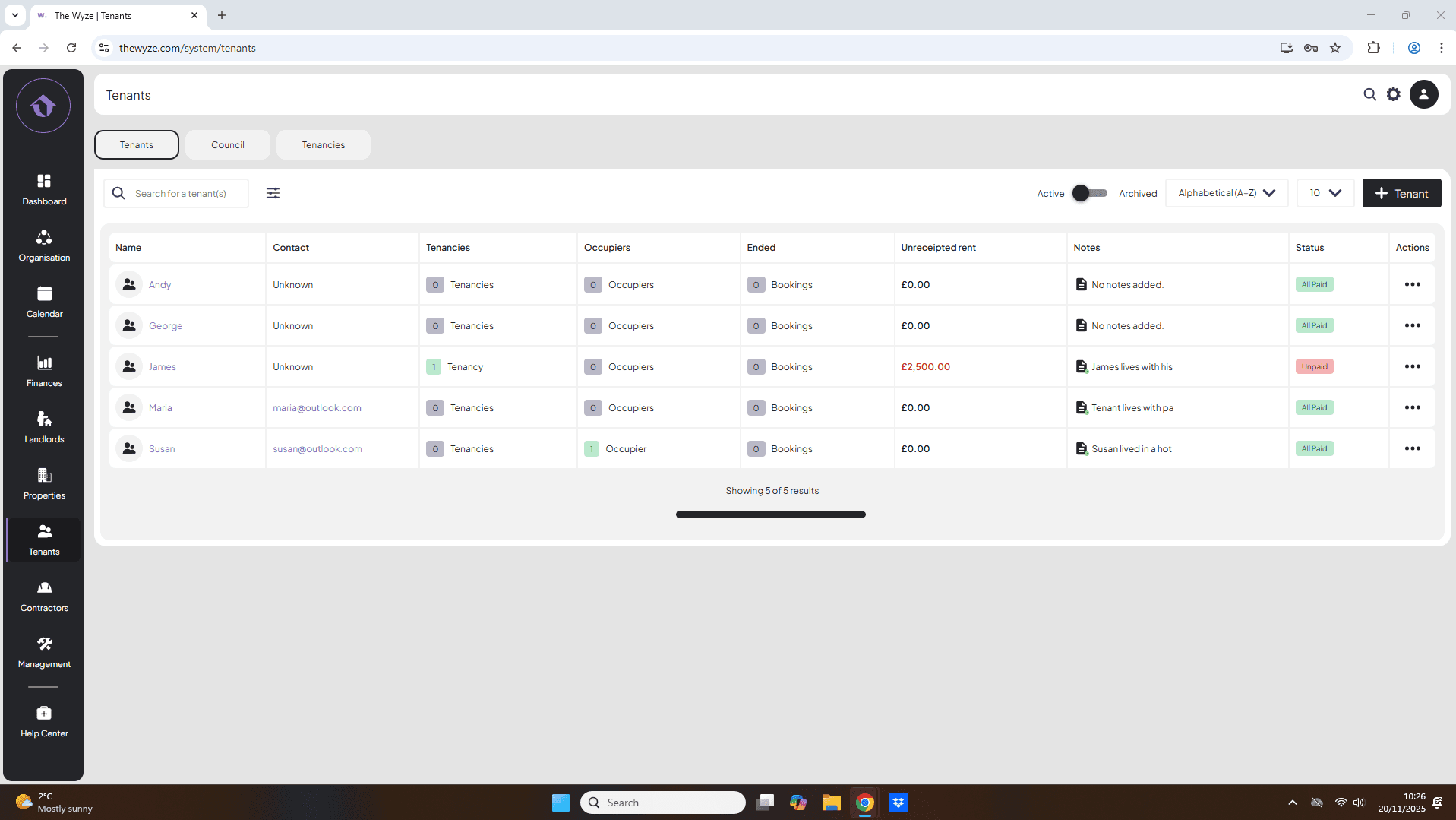
How to create a tenant

Step 1. Access the Tenants Tab 0:00

generated-image-at-00:00:00
  • Navigate to the left-hand side menu.
  • Click on the Tenants tab.

Step 2. Initiate Adding a New Tenant 0:16

generated-image-at-00:00:20
  • Move to the right-hand side of the page.
  • Click on the Add Tenant button.

Step 3. Fill in Tenant Information 0:21

generated-image-at-00:00:32
  • Enter the details for the tenant.
  • Select save.

Dashboard articules

Join our community.
Subscribe to our latest news and stay
updated !!!

Stay Informed, Stay Ahead.


Subscribe to our newsletter for the latest updates, expert insights, and exclusive offers.
Don't miss out on valuable tips and trends | sign up today and elevate your rental experience with us!


Company


© 2020 - 2025 The Wyze. All Rights Reserved.

Designed & Developed by KRETT.com